Overview
A toll road is one of the few pieces of infrastructure that makes a map feel governed. Somebody owns that bridge, somebody decided what a truck pays to cross it at four in the afternoon, and somebody is going to hear about it when you run the arm.
This resource gives you all three. You build plazas by standing in them, price them by vehicle class and time of day, and the money lands in a business account, in named people's pockets, or split between them. Drivers pay at the window, from the car, or with a prepaid tag that opens the arm without them touching anything. The ones who do not pay end up on a list, on a bill, and on the radio.
Everything is decided on the server. Where a vehicle is, what it is, what it owes, whether it crossed the line, and whether the arm was up when it did. The client is told what to draw; it is never asked what happened.
It runs on qb-core, qbx_core, es_extended or standalone. Nothing is a hard dependency and no database is required; the plaza hardware is a prop pack that streams with the resource.
Requirements
None. The resource starts and works on a bare server. Everything below is optional, detected at runtime, and degrades cleanly.
| Optional | What it adds | Without it |
|---|---|---|
qb-core / qbx_core / es_extended | Players, jobs, cash and bank | Standalone: plazas, tags, bills, tickets and violations all work; cash and bank have nowhere to come from |
qb-banking / qb-management / Renewed-Banking / okokBanking / esx_addonaccount / esx_society | Revenue into a business account | Held on this resource's own books and shown to a manager to settle |
okokBilling / qb-phone / esx_billing | Bills that arrive on a player's phone | Bills are kept here and paid from the tablet |
sals_kewldispatch, ps-dispatch, cd_dispatch, qs-dispatch, rcore_dispatch, core_dispatch, linden_outlawalert, sals_kewljobnotify | Violations reach your dispatch system | Every on-duty officer gets a notification and a blip |
sals_kewlsignage | Overhead gantries with live prices, and real lane heads | The resource draws its own lane lights and prices in the world |
ox_lib | Notifications | Your framework's own, then chat |
oxmysql / mysql-async / ghmattimysql | Records in a database instead of JSON files | JSON files in data/, which is entirely adequate |
There is no dependencies block to edit. Nothing
is listed as a hard requirement, because listing an optional resource there makes
this one refuse to start on a server that does not run it.
Installation
- Extract the folder into your server's
resources/directory. The folder must be namedsals_kewltollsystem. - Add the start line to
server.cfg:ensure sals_kewltollsystem - Give yourself the administrator permission:
add_ace group.admin salskewl.toll.admin allow - Start the server. It writes
config.local.luafor you and prints what it found:[sals_kewltollsystem] framework: qb [sals_kewltollsystem] banking: qb-banking [sals_kewltollsystem] ready: 3 plaza(s), 10 lane(s), framework qb, banking qb-banking - In game, run
/toll, open Plazas, and switch on one of the three example plazas. Drive to it.
That is the whole install. Everything else is optional.
The example plazas
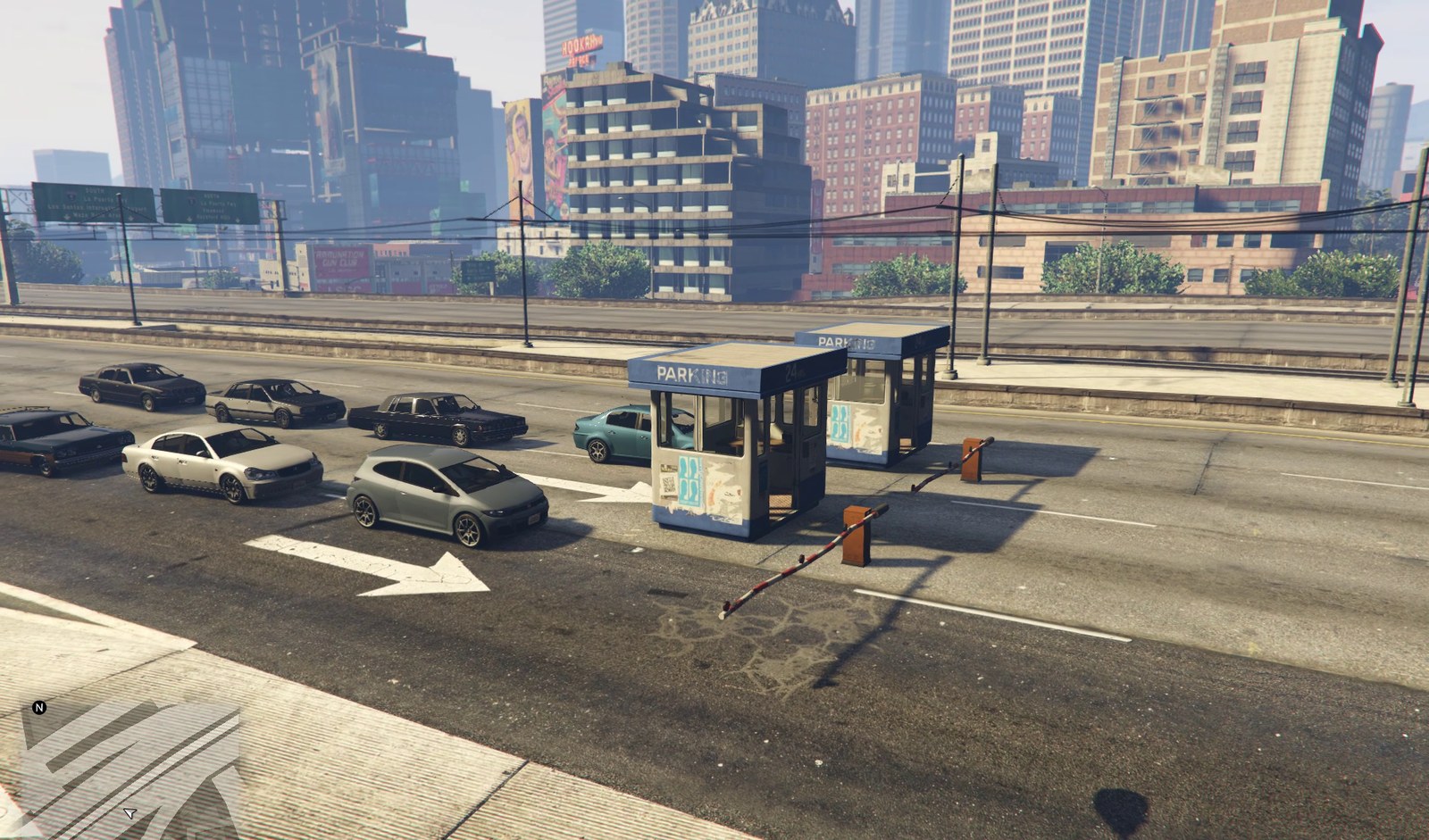
Three ship with the resource: a plaza on the Olympic Freeway viaduct through downtown, another on the Del Perro Freeway on the far side of the city, and a ticketed exit on the Great Ocean Highway — three lanes each: an express lane, an automatic lane and a cash lane. They are loaded on a server that has no plazas of its own, and they ship switched off, so nothing appears in a road until you turn one on.
Every position in them came out of the game rather than out of a map screenshot: each is a road node the engine reported, and the ground under every single lane was probed before the file was written. The lanes sit 7 m apart — a 3.5 m vehicle path plus a 3.5 m island for the booth — because a toll lane needs room for both, and the booth is a real kiosk with a footprint.
They are still a starting point, not a survey. They are on the right stretch of
the right road on a stock map, but every server's map is modified differently.
Turn one on, drive to it, and nudge it with /tollbuild until the
outlines sit on the tarmac — about a minute per lane.
Database
Nothing to import. On the default file backend everything lives in
data/ as JSON. Set Config.Persistence.Mode = 'sql' and the
tables are created on first start against whichever MySQL resource you run.
Back up data/. It is small, it is all JSON, and
it is the only copy of your plazas, your transponder balances and your revenue
history. It is never in a download, so an update cannot touch it — but nor can it
restore it.
How a toll plaza works
Five words carry the whole model. They are worth reading once before you touch the config, because everything else is named after them.
| Authority | Who owns the toll and gets paid. A business account, a person, or several of them with a percentage split. Every plaza belongs to exactly one. |
|---|---|
| Plaza | A tolling location: a name, a position, some lanes, and the authority it pays. |
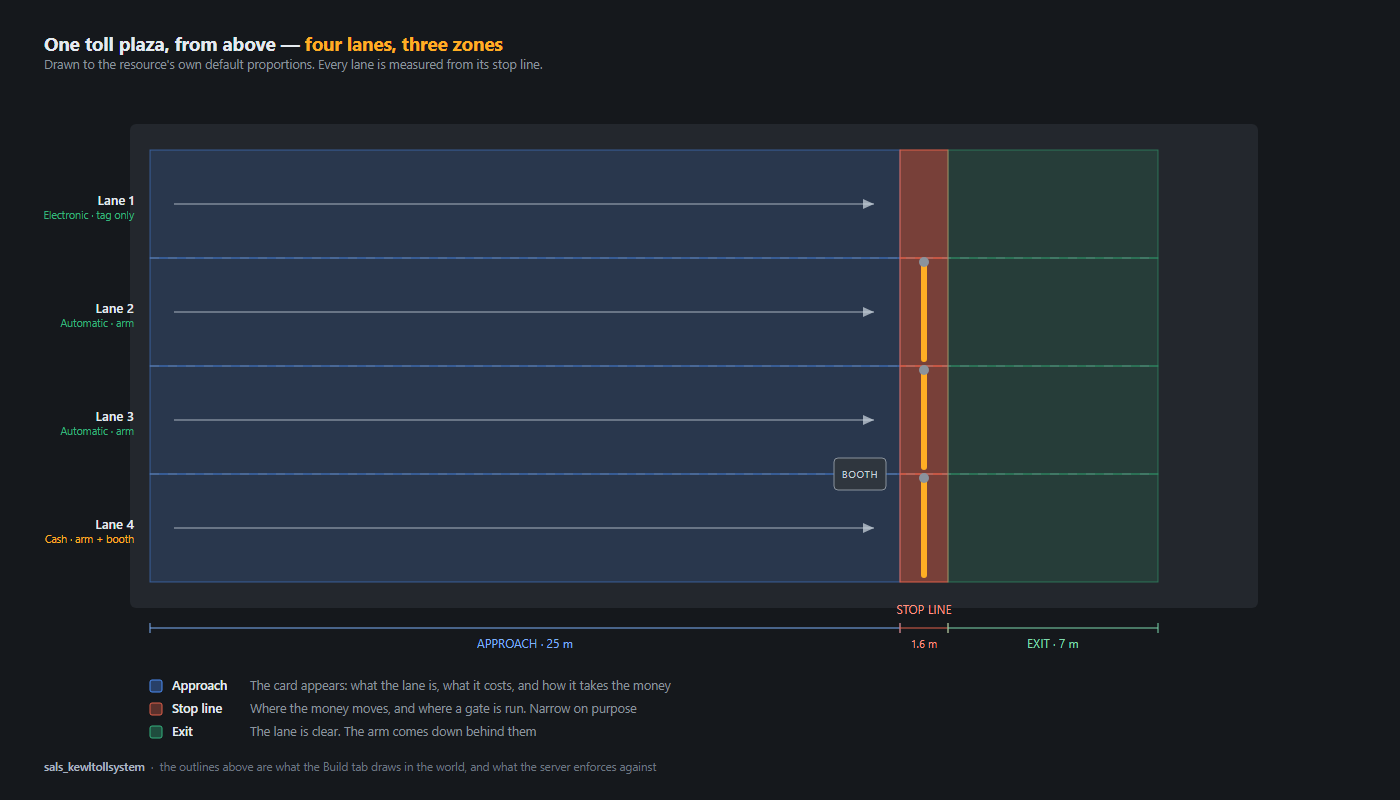
| Lane | One vehicle path through the plaza: a gate, maybe a booth, and three zones measured from the stop line. |
| Transponder | A prepaid tag bound to license plates. The thing that makes a toll road pleasant instead of annoying. |
| Violation | A vehicle that went through without paying, and the record of it. |
The three zones
Every lane is measured from its stop line — the point where the arm is. Three zones run from it:
| Zone | Default | What happens there |
|---|---|---|
| Approach | 25 m before the stop zone | The card appears with the price and what the lane takes. A transponder is read here. |
| Stop zone | 6 m back, 1 m past | The prompt, the payment, and the enforcement line |
| Exit | 7 m past | The lane is clear; the arm comes down |
The stop zone is not centered on the line. It reaches back from
it, because the server measures a vehicle's center and a car halted at a closed arm
has its center about half a car-length behind the barrier. A zone centered on the
line is a zone no stopped car is ever inside.
Config.Advanced.StopBand is how far back it reaches;
StopOverrun is how far past the line still counts as being at it, and
wants to stay small — past the line is past the gate.
Why the arm is already moving when you get there
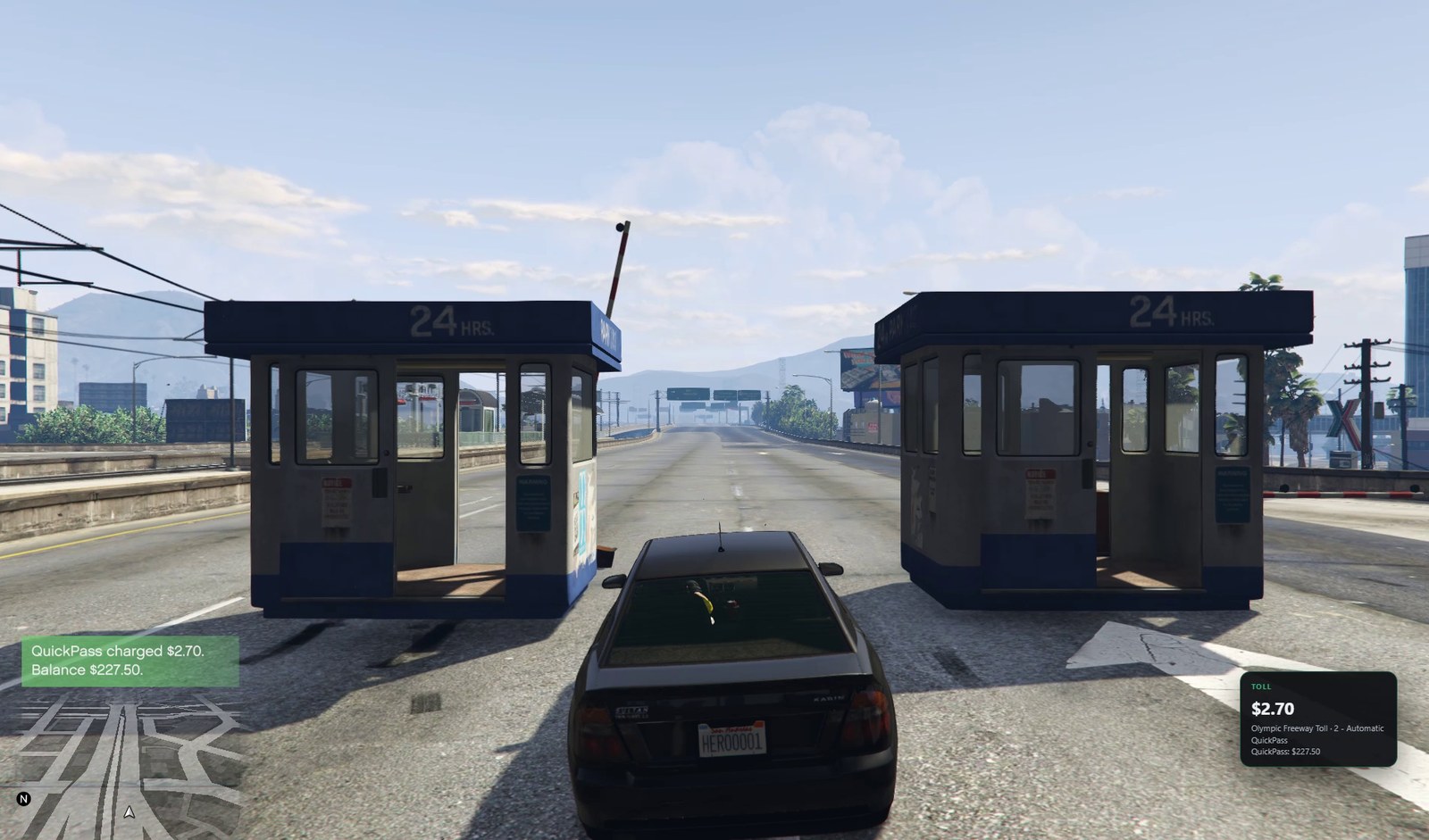
A transponder is read on the approach, not at the line. That is how a
real plaza works, and it has to: the arm takes
Config.Gate.SwingSeconds to rise, and a tagged driver who still has to
stop for it has not been sold anything.
Config.Transponder.ReadDistance is the distance, and its default is
arithmetic rather than a round number — the distance the fastest car the resource
will open for covers while the arm is moving, plus the length of car that sticks out
in front of the point being measured:
Gate.SwingSeconds × Advanced.MaxPayingSpeed | 1.8 s × 11.2 m/s | 20 m |
| half a vehicle, bumper to center | 3 m | |
| ReadDistance | 24 m |
Raise the swing time or the maximum paying speed and this has to come up with them, or tagged cars start nosing a barrier that is still rising. Too long and the arm opens for a car that is still two places back in the queue. It never reaches past the lane's own approach length.
Once a vehicle has paid, the arm stays up until it is through, however long it dawdles. Nobody is fined for running a gate they had already paid to open.
Why crossings are detected the way they are
The server checks where everybody near a plaza is, four times a second. At that rate a car doing 120 mph moves 21 meters between checks — straight through the stop zone without ever being inside it.
So the check is not "is this vehicle in the stop zone". It is "which side of the stop line is it on", remembered between ticks, with a change from before to after treated as a crossing. That is true at any speed, because a vehicle cannot get from one side to the other without crossing.
Building a plaza
Plazas are not in config.lua. They are placed in game and stored in
data/plazas.json, for the same reason signs are: typing world
coordinates into a Lua file by hand is nobody's idea of a good evening.
The tablet's Build tab collects what a plaza is — its name, its authority, whether it issues tickets — and then hands over to the world, where you place the lanes.
Stand on the stop line, facing the way traffic travels.
| Key | Does |
|---|---|
| Arrow keys | Move the lane, in the lane's own frame |
| Shift + up/down | Height |
| Left Alt (hold) | Fine movement |
| Q / E | Rotate |
| Z / X | Width |
| G | Gate type: arm, bollards, none |
| H | Lane mode |
| B | Booth on this lane |
| T | Drop onto the road surface |
| Enter | Place this lane and start the next |
| Backspace | Cancel the lane in hand; again to leave |
| F | Save the plaza |
The blue, red and green outlines are the approach, the stop line and the exit. They are the same geometry the server enforces with — not a preview that could disagree with it.
Check the white arrow before you save. It is the direction of travel, and a lane placed backwards charges people leaving the plaza. It is an easy mistake and an obvious one once you look.
Nothing is saved until you press F. Backspace with no lane in hand leaves placement mode and discards the draft.
Moving a plaza to another server
Export in the Build tab writes
data/plazas.export.json. Copy it to the other server as
data/plazas.json and restart. Or use the
ImportPlazas export from a script of your own.
Lanes & gates
Four kinds of lane
| Mode | Behavior |
|---|---|
| Automatic | A machine. The driver pays from the vehicle with a key press, or their tag pays for them. |
| Cash | A staffed window. An attendant takes the money and raises the arm. With nobody on duty it behaves as automatic — see Staffed booths. |
| Electronic | Open road tolling. Nothing to stop for: the tag is charged at speed, and a vehicle without one is billed by plate. |
| Closed | Out of service. The arm stays down, and the lane head shows red. |
The hardware
Swing arms on their cabinets, rising bollards, glazed kiosks on kerbed islands, a
canopy section over every gated lane with TOLL on the fascia, a reader gantry over
every electronic one, and a signal head per lane — eight models built for this
resource and streamed from its stream/ folder, under 400 KB together.
They have collision: a car that does not stop hits the arm. Every slot in
Config.Hardware can name a stock prop instead, and
stream/MODELS.md says where each piece goes and how to replace one
with your own.
Every prop is local to each client. Nothing is a networked entity, and that is the single most important decision in the resource. A networked barrier has an owner, ownership migrates to whoever is nearest, and the moment that player drives away the arm stops animating or is deleted. Instead, each client spawns its own copy at coordinates derived from the lane and animates it from the gate state the server publishes. Nobody owns the arm, so nobody can take it away.
With Config.Hardware.BlockTraffic on, NPC traffic queues behind a
closed arm instead of driving through it.
Swapping the barrier model? Open
integrations/hooks/client/hardware.lua. Every barrier prop has its arm
pointing a different way, so there is no rotation that is right for all of them.
That file says which line to change and why, and it is not encrypted.
Pricing
A price is resolved in this order, and the first answer wins:
- An exemption — free, logged, no prompt and no stop.
- The lane's own price, if it has an override.
- The plaza's own class table, if it has one.
- The server-wide table for the rate period in force.
- Minus the transponder discount, if they paid with a tag.
Rate periods
Config.Pricing.Bands ships with a weekday morning peak, a weekday
evening peak, an overnight rate and an off-peak catch-all. A band that crosses
midnight is handled correctly. The first band that matches wins, so order matters
and the catch-all is last.
Vehicle classes
Six ship: default, motorcycle, commercial,
bus, trailer and emergency. A vehicle that
matches none of them pays the default rate.
Class is decided on the server, and this is worth knowing about.
GetVehicleClass does not exist server-side, and asking the client
would let a modified one pay motorcycle rates in a semi. So the server works it
out from what it can see: the model hash, matched against
Config.Pricing.ModelClass, and then the engine's own vehicle type.
The shipped list covers the vanilla commercial vehicles, buses and emergency vehicles. Add your server's add-on trucks to it — that is the one piece of pricing configuration most servers will need to touch.
The preview
The Pricing tab answers "what would a semi pay at half past five on a Tuesday" using the same function the gate charges with. A manager can set a price and see what it does without waiting for half past five.
Who never pays
Config.Pricing.Exempt covers jobs, exact plates, vehicle models, and
— the rule that matters in play — an emergency vehicle with its lights
on. A unit running to a call does not stop.
For anything a config table cannot express, there is
integrations/hooks/server/exempt.lua: a plain Lua file where "free on
Sundays" or "free for anyone whose gang owns the plaza" is about four lines. It
ships doing nothing.
Transponders
A tag is a prepaid balance held by this resource and bound to one or more license plates. When a vehicle whose plate is bound reaches a lane that takes tags, the toll comes off the balance and the arm goes up without the driver touching anything.
That is the entire product, and it is why the discount exists: paying with a tag is cheaper than paying at the window, so players want one.
Why the balance is not a bank account
Because a tag has to work when the holder is offline, when the server has no framework at all, and when somebody else is driving the car. None of those are true of a bank account. A tag is an account in its own right.
Plates are the key, not owners
The tag charges for whatever is driving the vehicle whose plate is bound to it — exactly like the real thing. Lend somebody your car and you pay their tolls.
What you can configure
- What they are called.
Config.Transponder.Label— E-ZPass, FasTrak, SunPass, or whatever your state uses. It appears everywhere a player sees the word. - The discount, the issue fee, the smallest top-up and the low-balance warning.
- Automatic top-up, which holders switch on for their own tag from their page of the tablet. It only ever charges an online holder's bank.
- Whether a negative balance is allowed, which keeps traffic moving and turns the shortfall into a bill.
- An inventory item, off by default — the tag works perfectly well as an account, and the item means adding one to your framework.
Bill by plate
What happens when a vehicle owes a toll and nobody paid it: an electronic lane with no tag, a driver with no money, or a violation you chose to bill rather than fine.
This resource always keeps its own copy of every bill. A billing adapter is how the bill reaches the player's phone; it is not where the bill lives. So a bill survives the billing resource being restarted, uninstalled, or never installed at all, and the player can always pay it from their own tab in the tablet.
- Bills are consolidated. Several unpaid passes by the same plate become one bill, because sending an invoice per car per gate is how you make a player hate your server.
- An administration fee is added, which is what makes paying at the gate cheaper than being invoiced.
- There is a ceiling. Past
Config.PlateBilling.MaxOutstandingthe gate stays down and the driver has to pay at the window. Without one, a plate can run up an unlimited tab.
Most toll bills are raised against a plate whose driver has already logged off, so an adapter that can only invoice an online player will often decline — and nothing is lost when it does.
Turnpike tickets
Off by default. Switch on Config.Tickets.Enabled and a plaza can
take a role, set per plaza in the Build tab:
| none | An ordinary toll. Pay and go. |
|---|---|
| entry | Issues a ticket, charges nothing. |
| exit | Charges for the trip the ticket describes. |
| both | A plaza in the middle: takes the old ticket, charges for that leg, issues a fresh one. |
Tickets are keyed by plate, not by player, because the ticket is in the car. Swap drivers at a rest stop and the new one pays for the whole trip, which is correct and occasionally funny.
A trip is priced from Config.Tickets.Matrix if that exact pair is
listed, otherwise by the straight-line distance at a price per mile, clamped to a
minimum and a maximum, and scaled by the vehicle's class so a semi pays semi rates
without you writing a second matrix.
A lost ticket — none at all, or one older than the expiry — costs the most expensive trip that could have ended at that exit. Real turnpikes do exactly this, and it is the only thing that stops a driver throwing the ticket away.
Staffed booths
A cash lane is a lane a person works. They clock on to it from the tablet while standing in the booth, see the vehicle at their window and what it owes, and either take the money or wave it through.
Their key — E by default — takes the cash without opening anything, so a busy plaza is not a tablet per car.
They can be paid a commission, which comes out of the authority's share rather than out of thin air: an owner paying their staff 10% is choosing to receive 90%.
An unstaffed cash lane does not block the road.
Config.Attendant.IdleLaneBecomesAutomatic is on by default and makes
a cash lane with nobody in the booth behave as an automatic one. Turn it off and
an unstaffed cash lane closes itself, which is more realistic and much more
annoying at four in the morning.
An attendant can take the money in front of them and raise their own arm. They cannot change a price, open somebody else's lane, or wave a vehicle through at a lane they are not standing in. Every one of those is checked on the server, because an attendant is just a player with a job.
Violations
Three things are recorded:
- Running a gate — crossing a stop line with the arm down.
- Tailgating — following a paying vehicle through its opening. Switchable.
- An unpayable electronic passage — no tag, and the plate cannot be billed.
A violation is recorded against the plate with what was owed and the fine, and it
is readable by your MDT through the GetViolations export.
What happens next is a file, not a setting
integrations/hooks/server/violation.lua decides whether the offender
is fined from their bank, billed on their plate, reported to the police, or simply
noted. It ships with a working implementation that reads
Config.Enforcement.FineMethod — and it is a plain Lua file outside the
asset encryption, so a server that wants something else entirely can write it.
The same goes for police.lua, which already knows how to reach eight
dispatch resources and falls back to notifying every on-duty officer directly.
Repeats
The same plate at the same lane is not recorded twice within
Config.Enforcement.CooldownSeconds. One bad reverse at an arm would
otherwise trip the detector four times in ten seconds, and four fines for one
mistake is how a player stops playing.
Who gets paid
Each authority lists where its revenue goes and in what shares:
Config.Authorities = {
    ['sa_turnpike'] = {
        label  = 'San Andreas Turnpike Authority',
        payout = {
            { kind = 'society', id = 'tollauthority', share = 80 },
            { kind = 'player',  id = 'ABC12345',      share = 15 },
            { kind = 'ledger',  id = 'reserve',       share = 5  },
        },
        managers = { jobs = { 'tollauthority' }, minGrade = 2 },
    },
}| society | A business account, through whichever banking resource you run. |
|---|---|
| player | A person, by citizen id. Offline people are paid on their next login. |
| ledger | This resource's own books, shown on the Accounts tab as a balance to settle. |
Money is never lost
Every path that can fail ends in the same place — held on the ledger and shown to a manager:
- No banking resource installed
- The banking resource refused
- The person being paid is offline and queueing is off
- The shares add up to 90% — the missing 10% is held rather than quietly given to whoever is listed last
Shares are computed in integer cents and the rounding remainder goes to the last target. Three ways of splitting a dollar is 33, 33 and 34 cents, and over a hundred thousand cars that missing cent is real money.
Read Config.Money.Rounding before you price anything.
Some framework money functions silently drop decimals. On those, a $3.50 toll
collects $3.00 and your books disagree with your bank by fifty cents a car. If
yours does that, set it to 'whole' and price in whole units. This
resource's own ledger and every transponder balance are exact to the cent either
way.
Signage
With sals_kewlsignage installed, a plaza can drive real overhead
boards. You place the signs with the signage editor you already know and paste their
ids into the plaza from this resource's Build tab — two resources, each doing the
thing it is good at, joined by an id.
| Binding | What it does |
|---|---|
| Price board | Gets the current prices as template variables, so the message you wrote in the sign editor stays yours. Write CARS {price_car} once and this fills in the number as the rate band changes. |
| Lane heads | One per lane. Green, red or amber as the lane opens, closes or goes tag-only. |
| Alert boards | Taken over for a few seconds on a violation, then released back to whatever they were showing. |
Without the signage resource, this one draws a colored lane light and the price in the world instead. Not a substitute for real signs, but a toll plaza where a driver cannot tell which lane is open is not a toll plaza.
The tablet
/toll opens it, and what it shows depends entirely on who you are.
| Role | Decided by | Sees |
|---|---|---|
| Administrator | ACE salskewl.toll.admin, or a job in Config.Admin.Jobs | Everything, plus Settings and Build |
| Manager | Listed in an authority's managers | Their plazas, pricing, accounts, transponders, violations, reports |
| Attendant | A job in Config.Attendant.Jobs | One lane: the vehicle at the window, take or waive |
| Driver | Anybody | Their own tags, bills and violations |
The tabs are Dashboard, Plazas, Pricing, Accounts, Transponders, Violations, Reports, Settings, Build, and a driver's own account page.
Reports exports a CSV, written by the server into
data/ rather than downloaded by the browser — NUI cannot save a file,
and a download button that appeared to work and silently did nothing would be worse
than telling you where the file is.
Hiding a tab is a courtesy, not a security boundary. Every action is re-checked on the server, so a player who finds a way to ask for a tab they were not sent still cannot do anything with it.
Commands
| Command | Who | What |
|---|---|---|
/toll | anybody | The tablet. |
/tolladmin | administrators | The tablet, opened on Settings. |
/tollbuild | administrators | Placement mode, without the tablet in the way. |
/tolldiag | administrators | What is loaded, what was detected, what has been taken today, and which lane you are standing in. |
/tolldiag plazas adds a line per lane. Run it first when
something looks wrong — it answers the five questions that come before
everything else, including which hooks are implemented and whether any of them has
errored.
Command names are configurable, and the tablet can be put on a key bind that players rebind themselves in Settings → Key Bindings.
Configuration & upgrading
Three layers, in order of who wins:
config.lua | Our defaults. Replaced by every update. |
|---|---|
config.local.lua | Your settings. Never in the download. |
data/overrides.json | Tablet saves. Beats both. |
config.local.lua is created for you on first start. It loads
immediately after config.lua and simply assigns over it:
Config.Pricing.Classes.default.peak = 6.00
Config.Enforcement.Fine             = 150.00
Config.Enforcement.PoliceJobs       = { 'lspd', 'bcso', 'sasp' }
To change one key inside a table, name that key. Do not re-declare the whole table, or you silently delete every other key in it:
GOOD   Config.Gate.OpenSeconds = 15
BAD    Config.Gate = { OpenSeconds = 15 }   -- loses SwingSeconds and the rest
Upgrading
Copy the new folder over the old one. Never delete the old folder
first: that takes config.local.lua and data/ with it. The
download does not contain either, so there is nothing to merge.
Every start, the console prints what your file changed:
[sals_kewltollsystem] config.local.lua: 3 setting(s) overridden.
   Pricing.Classes.default.peak       4.0 -> 6.0
   Enforcement.Fine                   75.0 -> 150.0
   Commands.Tablet                    toll -> tolls
It also warns about a misspelled setting, which is otherwise completely silent — it creates a key nobody reads and changes nothing, forever. And it tells you when a tablet save is beating your file, which is the single most confusing thing about having three layers.
If you lose your file, a copy is kept in
data/config.local.backup.lua, in the one folder an update cannot
reach.
Languages
English, Spanish, French and German ship, 528 strings each. Set
Config.Locale.
Nothing is hardcoded, the tablet included. The whole string table
is sent to the interface when it opens, and the interface's own JavaScript contains
no English at all — so translating this resource is copying
locales/en.lua, editing it, and nothing else.
A key you leave out falls back to the English one rather than showing a raw key, so a partial translation is a perfectly reasonable thing to ship.
Editing the integrations
Everything in integrations/ ships as readable Lua outside the asset
encryption, on both the server and the client, and it is meant to be edited.
That is a deliberate rule. There are dozens of banking resources, dozens of notification resources, and no two servers agree on what should happen to somebody who runs a toll gate. A seam nobody can open becomes a support ticket and then a patch release.
| Folder | Decides |
|---|---|
framework/ | How this resource reads your framework: players, jobs, money, items |
banking/ | Where an authority's share actually lands. Six adapters ship |
billing/ | How a bill reaches a player. Three adapters ship |
hooks/server/ | Violations, exemptions, police alerts, passages |
hooks/client/ | Notifications, prompts, props, the violation flash |
The safe way to change one
Copy the file, then edit the copy. Registering a name that already exists replaces it, the boot log says which file won, and the download never contains a file with your name on it — so your version survives every update. Editing our file directly works too, and is overwritten on the next update.
A hook that errors prints once, is skipped, and the toll plaza
keeps working. A hook file you delete simply means that event does nothing, with
one line in the boot log. Deleting
hooks/server/violation.lua is a legitimate way to say "record it and
take no action".
Full detail is in integrations/README.md, which ships in the
download.
Exports
local toll = exports['sals_kewltollsystem']

-- an MDT plate lookup
local violations = toll:GetViolations('46EEK572')
local owed       = toll:GetOutstanding('46EEK572')     -- in cents

-- a mechanic shop selling transponders
local tagId = toll:IssueTransponder(citizenId, { '46EEK572' })
toll:TopUpTransponder(tagId, 50.00)

-- a police resource closing a lane during a pursuit
toll:SetLaneMode('olympic_fwy', 'l2', 'closed')
toll:OpenGate('olympic_fwy', 'l3', 0)               -- 0 = hold it open

-- what a player would pay right now
local quote = toll:Quote(source, 'olympic_fwy', 'l2')
Also available: GetPlazas, GetPlaza,
GetLane, IsGateOpen, CloseGate,
SetPlazaEnabled, Charge, GetBills,
VoidViolation, MarkViolationPaid,
GetTransponderBalance, GetTransponderForPlate,
LinkPlate, ExportPlazas, ImportPlazas,
GetRevenue and GetAuthorityEarnings.
Events fired: sals_kewltollsystem:passage,
:violation and :payout.
Performance
Nothing ticks unless it has to.
- A player nowhere near a plaza runs one loop, once a second, comparing their position against a handful of plaza centers. Forty plazas cost the same as two.
- Inside a plaza the client rate rises to 75 ms, and a per-frame loop exists only while the player is actually at a stop line.
- Props are spawned within 120 m and deleted behind you. The arm animation runs at frame rate only while an arm is moving — about two seconds per car.
- The server's enforcement sweep checks players near a plaza every 400 ms. On 64 players that is a handful of native calls a second.
- Transactions are a log, not state. The running day is in memory, everything older is on disk, and the dashboard reads a daily aggregate. A year of history costs nothing to display.
What the server verifies
- Position. Every enforcement decision reads the player's real server-side coordinates against the lane geometry. The client's own idea of where it is never reaches the decision.
- Vehicle and class. Read from the entity on the server, from the model hash and the engine's vehicle type.
- Price. Quoted on the server. The client never sends an amount and could not be believed if it did.
- Payment before passage. The money moves first and the gate opens second, never the other way round, and every charge fails closed: if it cannot be proven the money moved, nothing happens.
- Permission. Re-checked on every tablet action, not once when the tablet opened.
- Rate limits on every net event, per player.
- The settings the tablet may write are a whitelist. Credentials, the administrator list, and anything read once at boot are not on it — because a setting that saves and appears to work but changes nothing until a restart is worse than not offering it.
Troubleshooting
Run this first
/tolldiagIt prints the plazas and lanes loaded, which framework and banking resource were detected, whether signage is connected, the clock and rate period in force, what has been taken today, which lane you are standing in, and every hook with the file that implements it.
Nothing appears in the road
Check the plaza is switched on in the Plazas tab — the examples ship off. Then
check you are within 120 m: hardware spawns at
Config.Hardware.SpawnDistance.
The arm is in the wrong place, or floating
The lane is placed slightly off. Run /tollbuild, press
T to drop it onto the road surface, and nudge it. Turn on
Config.Debug.Enabled to see the zones drawn in the world while you
work.
The arm rotates the wrong way
You have swapped the barrier model. Open
integrations/hooks/client/hardware.lua and move the angle from roll to
pitch, or negate it. The file explains both.
Nobody is charged
Check /tolldiag names your framework. On
standalone there is no economy to charge, and tolls fall through to
the plate or the tag. Then check the lane's mode: an electronic lane never
prompts anybody.
The price is wrong, or the wrong rate period is in force
/tolldiag prints the clock and the band. The server cannot
read the in-game clock — no FiveM server can, GetClockHours is
a client native — so it is taken from your time resource if you run a known one,
otherwise from the median of recent client reports, otherwise from the server's own
clock. Set Config.Pricing.Clock = 'server' to use real time and skip all
of that.
A truck is paying car rates
Add its model name to Config.Pricing.ModelClass. The shipped list
covers the vanilla vehicles; add-ons are unknown to it.
Revenue is not reaching the business account
Look at the Accounts tab. If the balance is sitting under "held on account", no
banking adapter confirmed the deposit. /tolldiag names the banking
resource it detected; Config.Payout.Society pins one by name. Money is
never lost — press Settle once the adapter is working and it is paid out for
real.
Edits to config.local.lua do nothing
Read the boot report. Either the path is misspelled — it says so — or a tablet save is winning, which it also says. Clear the setting in the Settings tab to fall back to your file.
Players are being fined for nothing
Almost always a lane placed slightly too narrow, so a car clips the edge and the
side test sees it cross. Widen the lane with X in
placement mode. Config.Enforcement.Enabled = false switches enforcement
off entirely while you work it out.
Support
Ask on Discord.
Bring the output of /tolldiag and the first twenty lines your server
console printed when the resource started — between them they answer most
questions before they are asked.
The README.md and CHANGELOG.md inside the download are
the same content as this page, kept in step with it.